Friday, May 2, 2014

Phase 3: Comprehensive Reflection

Comprehensive Reflection 
Standard One: Facilitate and Inspire Student Learning and Creativity
1. For this standard I would have students create their own story to share with the class using a program like imovie. This gives them the chance to create their own fairy tale movie using technology and a creative mind. 
2. For this standard I would have students plan their lives and expenses for one month. This allows them to solve the problem of distributing their money and paying bills. It also prepares them for their futures. 
3. For my second technology lesson I had students create their own shapes with a given area and perimeter. They used kidspiration. This allowed them to be creative because they were making their own unique shapes while reflecting on what we learned during that lesson. 
4.For this standard I would take my students on a virtual field trip that allowed them to communicate with others from around the world. I would use Google Plus. I think a fun field trip that would allow them to collaborate would be a trip to the zoo.

Standard TwoDesign and Develop Digital-Age Learning Experiences and Assessments
1. I understand this standard as just incoorportating technology into the lesson that allows the kids to be creative. I covered this strand in my first lesson that was about maps and geography. I had the students create their own maps using Google Drive. 
2. For this strand I might do a language app. For example, Duo Lingo allows students to learn a language at their own pace and assess their progress. 
3. For this strand I might do a lesson on cultural diversity. Students can pick a culture to research and then present their findings to the class. It will meet all the needs of students because they can decide how they present the information. For example, typing a paper, making a power point, a virtual poster, etc. 
4. I would use this strand and the third strand for this standard together. As the students research their cultures they will use recent  technology. For example, apps, ipads, smart boards, etc. 

Standard Three:Model Digital-Age Work and Learning 
1. For this strand I interpret it as students taking what they learned and incorporating that into technology. For this, I would have students try and learn an instrument using technology. There are many apps that would make this possible. Students are now learning something that doesn't typically involve technology but now can. 
2. For this strand I might have students learn about the role of researchers. What are their roles? Students can then interview parent and members of the community using video recorders and tape recorders to get hand on experience. 
3. For this strand I would teach students about timelines. They would then create their own virtual timeline  about one of their role models. The timelines will then be presented to the class. 
4. For this strand I will have my students perform their own science experiments that they have chosen. The students will then have to find current research that supports or argues their hypothesis. 

Standard Four:Promote and Model Digital Citizenship and Responsibility 
1. For this strand I will teach students about internet safety and the seriousness of plagiarism. I will then have students find an article that interests them to practice paraphrasing without plagiarizing. 
2. This strand reminds me of my math lesson. I had a variety of centers that the students could visit that were online. Each center was geared towards a separate need; this gave students a chance to practice with the material and concepts that they needed to work on. 
3. For this lesson, I will teach students that we can not steal peoples work. This will be tied into the first strand. After finding an article to use students will need to write a formal email to the writer, asking for their permission to use the article. 
4. For this activity, I will once again have students research a culture. They will then use technology to  present the information. When they present they need to explain how our cultures are different. I will then teach the students that we need to be accepting of everyone; even if we don't know them or just talk to them on the internet. We are all different and that never makes it okay to tease or make fun of others. 

Tuesday, April 29, 2014

Phase 2: Reflection of Lesson 2

Reflection On Lesson Implementation 
1. Instructional Decisions

- Overall, I think my entire lesson went well. I think all of my math centers were the best part of my lesson. The centers kept the students engaged but didn't allow them to get bored because we were on a rotation. One thing that could have gone better was the actual teaching portion. I found myself getting confused while I was trying to teach. For example, I meant to explain perimeter but found myself explaining area instead. I knew what I wanted to say but I was getting turned around. 

- I think my lesson was very well aligned with the standards. I met everything listed in the standards and assessed them. I feel the only standard I could have covered better was the understanding of a square unit. I think that's a type of standard that should be covered over a longer period of time since it's so complex. 

-I cannot think of any modifications made during my lesson. I think how I decided to explain it changed. I intentionally wanted to teach the short cuts but realized the students would first need the foundation of how to find area and perimeter without "cheating".

2. Mechanics 

- I used many technologies for my lesson. First I used the SmartBoard to teach the concepts of area and perimeter. I then had students use 3 different websites to play games on that allowed them to practice using perimeter and area. Finally, I had the students use Kidspiration for assessment. 

- The SmartBoard was used by myself to teach the lesson. I also had the students come up and use so they could get more practice with the material. The students used computers for the rest of the technologies. First they used 3 different websites. These websites had games that gave them even more practice with the material. They students also rotated through all of the websites. Finally, the students used Kidspiration for assessment. They had to make their own examples of area and perimeter on a graph. 

-My lesson was in the correct timeframe because I planned correctly. I knew I had an hour so I planned on spending the first 30 minutes teaching. The second 30 minutes were for the games and assessment. If I found that I was running out of time I just rotated the centers faster. However, I was on time and everything ran smoothly. 

3. Assessment of Learning


- My students level of success was varied. The following is examples of the two extremes. The first student seemed confused on the difference of area and perimeter. The second student seems to have understood the material very well. I can see that the second student met all of my standards. However, the first one didn't put units with her answers or correctly do perimeter on of of her shapes. 

-I think I was average in teaching this lesson. There is always room for improvement. I think if I had to do this lesson again I would spend more time teaching the material before I let them practice on their own. I think my reflection does reflect how well I did because I did average and the assessments show that. Overall I don't think I was bad at all; I still go the material out. My peer feedback was also good. I did get some suggestions about not getting confused while I thought but other than that it was all positive. It was nothing unexpected. 

Wednesday, April 9, 2014

Lesson Two: Materials

MATERIALS
1. SmartBoard
2. Copy of "Spaghetti and Meatballs for All"
3. Computers. 
4. Kidspiration

Lesson Two: Assessment

ASSESSMENT
Procedure: 
For my assessment students will be given the sum of a perimeter and area. They will need to create two possible layouts for the given numbers. The shapes can be completely made up as long as they fit within the given numbers. This assessment will be completed on Kidspiration; the students final product is what I will be assessing. This assessment meets my standards because they are solving perimeter and area problems on their own. I will know if they understand it because they are forced to use higher order thinking by creating their own layouts. 
Instruments: 
I will use Kidspiration to give my assessment. I will review the students final product to see if it has been completed correctly. The final product will be submitted to me via BlackBoard. 

REFLECTION
Planning Assessment: 
The assessment aligns because everything stated in the standards is within the assessment. At some point they will have to use perimeter and area by figuring out the best possible layouts. Having them create two possibilities lets me know if they understand that their are multiple ways to get the right answer. I will know if students are successful because they will be making their own layouts. If they don't understand a certain element the assessment will show it. The assessment keeps the students engaged and thinking critically because they have to create a shape that matches the given numbers, they also have to create two versions; so a simple rectangle won't cut it for both layouts. I will know if individual needs were met because each student is creating their own layout. Every student will have different numbers so I will know which students got it and which students didn't. 

Lesson Two: Implementation

IMPLEMENTATION
Procedures: 
1. I will introduce the topic to the students and explain what we will be doing that day. 
2. I will read the students "Spaghetti and Meatballs for All" 
3. On a SmartBoard I will call of students to recreate table arrangements from the story. We will discuss why they work or do not work. 
4. I will introduce them to the language of square unit, area, and perimeter. 
5. I will put more examples on the board of area and perimeter that are not from the book. 
6. I will call on students to come up and figure out what the perimeter and area are of the different shapes. (They will not all be rectangles and squares) 
7. I will then show the students how to access and use different math centers that I have set up for them. 
8. The students will rotate through 3 different centers. They will spend 10 minutes at each center. 
9. I will have student pull a piece of paper from a jar. On the paper will be a number that represents the area and perimeter. 
10. Students will create two different shapes that each add up to the given numbers. This will be used as my assessment. This will be created on Kidspiration. 
Technology Integration: 
Technology will be used throughout this entire lesson. After reading the story all of the review will be done on a SmartBoard. Students will have the chance by coming up and drawing on it and completing different math problems involving area and perimeter. I will also use the SmartBoard to show the students how to access their math centers. The students will then use their computers to access the games. The three games being used are: http://www.brainpop.com/games/dublox/ , http://www.ixl.com/math/grade-3/perimeter, and http://www.mathplayground.com/PartyDesigner/PartyDesigner.html. My assessment for this lesson will also be completed on Kidspirtation. 
Differentiated Instruction: 
For students with cognitive delays I will make sure to use a lot of scaffolding for them and visuals. I will also pull these students aside and give them the extra attention the may need before grasping the concept. I will also give these students manipulatives to use so they are able to work with the manipulatives to find area and perimeter easier. For gifted students will give them problems where they need to find a missing side of a shape to find the perimeter. I could also give these students a chance to find the area with only the perimeter and no squares to count, or vice versa. For ELL students I will also use scaffolding for them to visualize what is going on. I will also sit them next to a student they are comfortable with the talk through any problems they might be having. 
REFLECTION
Designing Instruction: 
I'm using these instructional needs because I believe that students need to be working hands on. They need to actually practice finding perimeter and area. I also think having the games makes learning and reviewing fun for the students. There are 3 different ways to look at perimeter and area if one way doesn't make sense. I also think this lesson as a lot of variety and movement keeping them engaged. I think this is best because it's engaging and geared towards their age group. If learning is fun and hands on students are more likely to learn more and take more in. It also gives them the chance to work through problems on their own that they might face in the real world. Student are using higher order thinking because the games force them to create areas and perimeters on their own. They are given a problem and forced to solve it. I don't use technology for my entire lesson. It acts as a supplement to give the students more practice with the material. If they are struggling then I will go back to a more hands on approach. 

Lesson Plan 2: Overview

OVERVIEW
Grade Level- 3rd
Subject- Math 
Topic of Study- Area and Perimeter 
Time Allotment- 1 Hour 

COMMOM CORE STANDARDS

CCSS.MATH.CONTENT.3.MD.C.5.A
A square with side length 1 unit, called "a unit square," is said to have "one square unit" of area, and can be used to measure area.
CCSS.MATH.CONTENT.3.MD.C.6
Measure areas by counting unit squares (square cm, square m, square in, square ft, and improvised units).
CCSS.MATH.CONTENT.3.MD.D.8
Solve real world and mathematical problems involving perimeters of polygons, including finding the perimeter given the side lengths, finding an unknown side length, and exhibiting rectangles with the same perimeter and different areas or with the same area and different perimeters.

OBJECTIVES
1. Students will be able to demonstrate how to find the area of different shapes by counting square units and multiplying. 
2. Students will be able to demonstrate how to find the perimeter of rectangles and squares by adding different lengths and widths together. 

REFLECTION 
Assessing Prior Knowledge:
Prior to this lesson the students will need to be familiar with basic math skills; specifically, adding and multiplying. Prior knowledge will be assessed when I have students recreate scenes from the story. If they are not able to then I know that I need to take a few steps back and refresh the students on adding. I will assess their knowledge on multiplication when I create my own shapes for them to assess. Once again, if they struggle I will quickly review how to multiply two numbers together. I will use this information in my planning process my adjusting my pace. If I find that many students are struggling I will slow down and spend more time reviewing. This lesson would become a few days long, as we would be doing a lot more review and moving forward slowly. 
Planning Instruction: 
This content should be taught at this level because it's knowledge they will be in the future. Students need to know how to find perimeter and area to continue and succeed in future math classes. This is also appropriate for 3rd grade because the story that goes with the lesson is age appropriate. The standards and objectives align perfectly because we are learning about the different aspects of area and perimeter. The students are also getting hands on experience working with the two. This lesson will be taught towards the middle of the year. Students will be taught how to add and multiply prior to this. This is also a complex way at looking at math for them so it would be unrealistic to throw it at them at the beginning of the year. 

Tuesday, March 25, 2014

Reflection on Lesson Implementation

Reflection on Lesson Implementation

Instructional Decisions 
  • During my lesson many things went well, but there were a couple of things that could be improved. First, I think actual activity of my students making their own map was a good idea. The students seem engaged and really interested in what they were doing. However, actually trying to explain symbols seemed to be the most difficult thing. I never really thought about what I would say prior to my lesson so I felt unorganized while presenting. I think if I had thought about what I actually wanted to say instead of just what I would show my students during our discussion things would have run more smoothly. 
  • Throughout my lesson I was able to keep in mind the standards and objectives while teaching. Even though I did have somethings that needed improvement I was still able to stay on task. Everything that I taught and discussed with my students was connected to the standards and objectives. We were able to get through all of my objectives successfully. 
  • During my lesson I only made one major modification. I originally had planned on using the book I read as more of a supplement. I wanted to go back and actually look at the pictures in the book to see the differences between all of the different maps. However, as I was reading the book I noticed that many of my students had lost interest. Instead of going back to the book I decided to just pull up pictures from the internet instead. 

Mechanics 

  • The technologies used throughout my lesson were the smart board and computers. On the computers the students accessed google drive. 
  • As the teacher I mainly used the smart board. I used it to look at different types of maps and symbols for the students to look at. Second, I used it to write different examples onto the board for the students to see. When it came to the students their entire activity was technology based. The students used google drive to create their own maps. 
  •  My lesson was in the correct timeframe because I was able to correctly gage how long each thing would take. My lesson also allowed students to add onto their work if they finished early. However, all of my students finished the activity within the given 30 minutes. 

Assessment of Learning
  • The following links are examples of what I had my students make. They are maps that they would use if they needed to get to school 
  • https://docs.google.com/drawings/d/10sFSg8EpVVumhOf0ABZx42IJ-_lF_udqfkSb6EnLiuc/edit?usp=sharing 
  • https://docs.google.com/drawings/d/1Yzbrxk1rnmJdyPkXN6TVP1N6AVSlFGpWaSPPKpuYAQg/edit?usp=sharing
  • My students were very successful in meeting the standards. While assessing my students maps they were all able to use symbols to represent different things. My students were also able to successfully make a key that included a variety of features. My students grasped the concepts that I taught beautifully based on my assessment. 
  • My level of success was good. I did have a few things that needed improvement based on my self assessment. I should have figured out what I wanted to actually say prior to teaching. Based on my feedback from my peers I did well. The suggestion I had was to pick a more engaging book. I think their feedback was accurate because, while reading the book it became clear that the book was not interesting enough for them. 

Sunday, March 9, 2014

Lesson Plan One: Materials and Resources

Materials and Resources

Materials: 
Me On The Map by Joan Sweeney 
Google Drive

Lesson Plan One: Assessment

ASSESSMENT
Procedure: 
I will assess the students work by looking at their maps. I will make sure that maps include things that I listed in my objectives. For example, having 3 land features and 3 physical features; as well as having a key and rose compass. If the students lack in one area I will know that I need to go back and review with that student or the whole class depending on how many students missed that area. 
However, beforehand that students will fill out their own checklist to make sure their maps meet all the requirements. This will also show me if the students think they understand something, but actually don't. 

Instruments: 
I will be using Google Drive to look at each students maps. I will complete a checklist for each student. I will also review that student's checklist that they filled out on their own. 

REFLECTION

Planning Assessment:

This aligns with the standards and objectives because the standards ask students to create a map including certain things like symbols. My objective, includes students creating a map that includes a minimum number of things. My assessment, looks at the student's map and if it includes the required things like symbols and a key. The assessment tells me if a student was successful by how they create their map. For example, does it look like a map? Does the map have a key? Does the map only have physical features? By looking at how much detail the students put in their map will show higher order thinking. The assessment will show that individual needs were met because each student is making their own map. 

Lesson Plan One Implementation

Implementation 

Procedure:
1. I will review what we have learned about maps prior to this class. We will look at a world map, United States map, and Flagstaff map. I will call on students to tell me which maps are which.
2. I will read a book about maps and community to the students. The book I will read is, Me On The Map by Joan Sweeney. 
3. I will ask students if they know what a symbol is. We will go back through the book and see if we can find any symbols.
4. After looking through the book the students will write their examples on the board.
5. I will ask students if they know how to get to school from their home.
6. I will then pair students if the students seem to be struggling. If not then they will be on their own. 
7. I will show the students my example of what they will be making. To review again I will ask them if they can tell me what type of map I created.
8. I will explain to the students that their maps need to have at least 3 physical features and 3 land features. They will also need to create a key for their map.
9. Students will open Google Drive and Create their own map of how they get to school each day.
10. Students will share their maps to one another. 
11. Students can peer assess each others work 

Technology Integration:
Throughout this lesson technology is constantly being used. When I review with the students I will use the computer to pull up different examples of maps (since I am only working with 3 students everything will be done by looking at the computer screen. If it were a larger class I would use a projector for this portion of the lesson). 
The students will then create their own maps using Google Drive. I will also be using Google Drive to assess the students work because they have the ability to share their work.

Differentiated Instruction:
Cognitive Delay- For students with cognitive delay I will have a simple key already created for them. This way the students just have to put the different symbols on the map.
Gifted- For gifted student will I have them expand on their map. For example, instead of just doing their  school route they can try to make a map of their entire community.
ELL- For ELL students I will sit them next to a student who speaks their native language to help them throughout the entire process. If I don't have someone who speaks their native language I will put them next to a student who will try and help them the best they can.

REFLECTION

Designing Instruction:
I am using the instructional method I described because it has a lot of scaffolding. Every aspect of my lesson has some form of scaffolding to help the students understand and remember what we are learning. However, while there is a lot of scaffolding and modeling the students are still being creative by making their own maps. This method aligns best with what I know to work best because we are doing multiple things to learn one skill. I am not just asking my students to build a map; there is a lot of build up till we actually get to the map making. Since students are asked to create their own map using their own symbols they are using higher order thinking. Every student is going to have a different map forcing them to bring out some form of creativity. Technology in the classroom is a great supplementary tool and that is exactly what it is used as in my lesson. I use it for the main activity but I use other things throughout lesson. It is also the type of lesson that can be changed if technology fails that day. If the internet doesn't work then students can draw their maps using paper and markers. 

Thursday, March 6, 2014

Lesson Plan One Overview

LESSON PLAN OVERVIEW

GRADE LEVEL: 3rd Grade

SUBJECTS: Social Studies

TOPIC OF STUDY: Maps 

TIME ALLOTMENT: 30 minutes 

STANDARDS: 
AZ State Standards: Strand 4: Geography 
PO 3. Construct a map of a familiar place (e.g., school, home, neighborhood, fictional place) that includes a title, compass rose, symbols, and legend
PO 4. Construct maps using symbols to represent human and physical features.

OBJECTIVES:
1. Students will list different land marks in a web using pixie.
2.. Students will be able to construct their own community map using Google Drive. To include a key and at least 3 symbols for human features and 3 symbols for physical features.

REFLECTION

Assessing Prior Knowledge: 
Coming into this lesson the students should be familiar with what different types of maps look like. The students should also be familiar with Google Drive. I will assess prior knowledge by asking the students about symbols, and if they can think of any symbols on their own. I will also ask students if they know how to get from home to school. I will use this information to gage how much assistance my students will need in creating their own map. If students don't know how they get to school then I might pair that student with someone who does. I will also plan for extra time to go over what a symbol is if the students have no prior knowledge.

Planning Instruction:
The content should be taught at a 3rd grade level because of what is being asked of them. At 3rd grade students should be  more aware of their surroundings compared to a younger student. Since students are more aware they should be able to create a map of a familiar area. This also starts to get students comfortable reading and using a map for more complex work in later grades. The objectives align with the standards because they each have an action that the students will do that matches each standard.
The objectives also come with a certain expectation so I as the teacher can know if the standards have been met. For example, in my 2nd objectives students need at least 3 physical features in their own maps. This lesson will be taught in the beginning of the year but after we have had a week or so to go over maps and become familiar with the technology in the classroom. This will be taught towards the beginning because it will give them knowledge to use maps in the future. Maps are used in social studies and math. This will make it easier in the future because they will already know how to use and read a map.

Saturday, February 8, 2014

Global Digital Citizen Post Four

Meeting Diverse Needs of Learners Through Learner-Centered Strategies and Equitable Access 

Everyone in this world is different and so are their learning styles. The technology in classroom's today allow for all learners to be successful. Learner-centered strategies allow for all students to have the chance to learn the best way they know how. In the book, Learner-Centered Teaching: Five Key Changes to Practice, it explains that learning-centered teaching needs to focus on the child's needs and what allows them to learn best. As teachers we need to make sure that we are teaching for all of our students and not just some of them. This means giving all of our students equitable access to the tools and strategies they need to learn best. This includes what we are having students access through technology. For example if you're teaching a lesson on science and you have a visual learner then it would be best to include a resource that supports visual learners; as well as your other students. What it all comes down to is equity. We need to support all of our students and give them the resources they need.


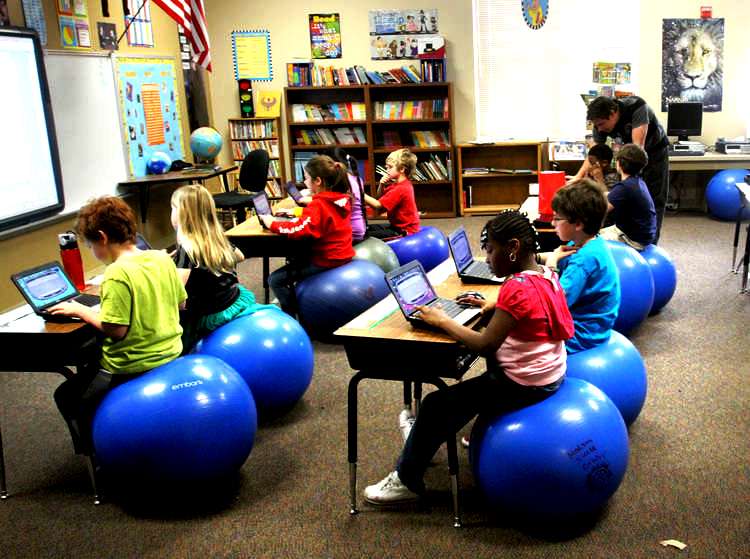
When I have my own classroom I plan on implementing this in many way. First I will make sure that when I teach a lesson I teach to all the learning strategies. I will make sure that students have access to the tools they need to do their best learning. I also think it would be a good idea to have technology centers. Each center can be geared towards a learning strategy. This will give all of my students the chance to work on improving their learning strategies in the weaker areas. Above is an example of what my classroom might look like. As we can see there are multiple sources of technology being used for all of the different learners. 

Sunday, February 2, 2014

Global Digital Citizen Post Three

Global Awareness & Digital-Age Communication

For better or worse we live in a society that has the world at its finger tips. It has become easier than ever to stay connected with the world; making us globally aware. Anyone can open the internet and Google the latest happenings around the world with one click. As teachers this is something to take full advantage of; articles and videos can easily supplement any lesson. As teachers it is also our jobs to teach students how to find this information so they can continue to be globally aware once they leave your classroom. Students can also become globally aware by using different forms of digital-age communication. When I think of digital-age communication I think of social media sites, texting, video chat. These are all the ways students and ourselves stay connected to the world. For example, Facebook allows people from completely different continents to communicate. As a teacher it's our job to keep parents informed on what's going on in the classroom. With the digital-age communication we have today creating a classroom website has never been easier. Teachers can also pull up live broadcasts for students to watch in real time. There is no longer an excuse to not be globally aware and there is no reason we should not be using this technology to enhance our classroom.  

Thursday, January 23, 2014

Global Digital Citizen Post Two

Digital Etiquette and Responsible Social Interactions 

When I think of my future students being responsible on the internet I immediately think of cyberbullying. While, they may not be on social media sites in my classroom it is still important they know the repercussions of cyberbullying. Students often post stuff online without thinking twice about it. What we say can really break a person down if we aren't careful. There are also predators on the internet looking to take advantage of young children. Students need to be aware that what they put on the internet is not only seen by their friends but essentially everyone on the internet. Since anyone potentially has access to our social networks is extremely important to watch what information we are giving out about ourselves. While it may not be appropriate to dedicate an entire lesson to cyberbullying and predators to young students, it is important to include it in your hidden curriculum. The video below is a PSA for cyberbullying. It's a different way of looking at the effects of bullying online. The video can be found at http://www.youtube.com/watch?v=kpsGRYbhBbM


Digital etiquette is defined as, "a basic set of rules you should follow in order to make the internet better for others, and better for you. It's just as important to treat people with courtesy and respect online as it is in real life" by http://www.nisd.net/digitalcitizen/sec_digcit/etiquette_6_12.htm. This being said it is clear that digital etiquette and responsible social interaction really go hand in hand. The way we treat each other on the internet matters. The information we put out there matters. As a future teacher it's important my students understand the responsibility that comes with logging onto the internet. They can easily become a predator r or a victim. My goal is to make them neither by teaching them what is and isn't smart to put on the internet. I think it's also my goal to make sure my students do not have access to sites that ask students for personal information or allow them to communicate to complete strangers. This relates back to my first post and the importance of setting up blockers on school computers to keep students safe while they are at school. 

Friday, January 17, 2014

Global Digital Citizen Post One

Safe, Legal and Ethical use of Digital Information and Technology in the Classroom


Having technology in the classroom can enhance a child's learning in many ways. However, it is extremely important that the technology is used in a safe and ethical manner. When students get on the internet they are essentially leaving the classroom and left to their own devices. This is why it is important to make sure you've created a safe environment on the computer. This can be achieved by the following: 
1. Students are only allowed to use teaching and learning sites. 
2. Do not rely on the internet to teach your students. The internet should only be supplementary
3. Give students guidelines to follow when they are accessing the internet
4. Make sure all devices have a safety setting so students aren't able to access inappropriate websites. 

The legal and ethical use of the digital information falls on the teacher for the most part. As far as the students are concerned the most important thing for them to learn about is plagiarism. They need to know what is means and how to avoid it. I think it's the teacher's responsibility to supply legal and ethical material. Students use the resources that are given to them by the teacher. As teachers we need to make sure before had that it is legal and ethical.

As a teacher it is extremely important to model safe, legal, and ethical use of digital information. Student's look to their teachers to know what is right and wrong. If we show students that being safe on the internet or not citing our sources isn't important why should we expect them too? Plagiarism is like stealing and stealing is never okay. Taking digital information seriously teaches students to respect the power. The internet is a big scary place and that's why we need to be smart with what we decide to do on it.